
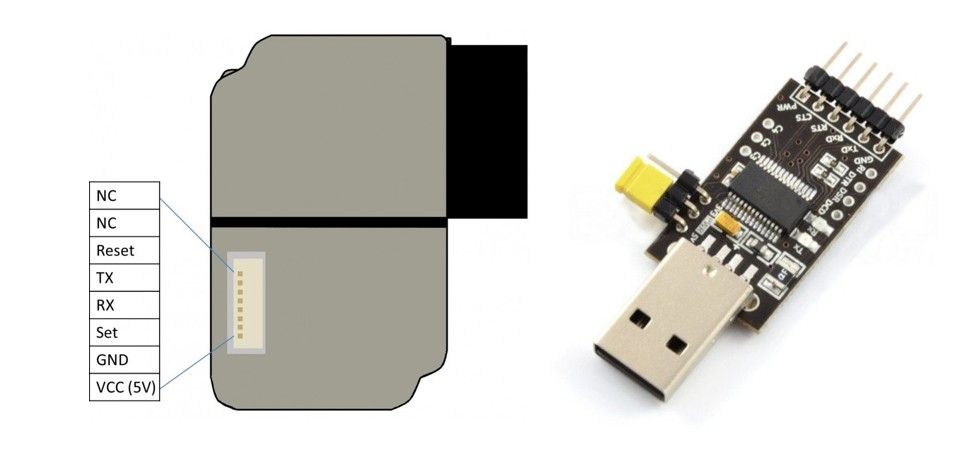
Connection and Data Reading
The Plantower PMS3003 sensor, frequently preferred in air quality monitoring projects, measures the amount of particles in the air using the laser scattering principle. In this guide, we will examine step by step how to read the sensor using Python.
1. Required Hardware and Connection Diagram
The easiest way to connect the sensor to a computer or microcontroller is to use a UART-USB converter. It is recommended to use a JST 1.25 mm to 2.54 mm DuPont cable for the connection.
- VCC (5V): Power input.
- GND: Ground line.
- TX (Sensor): Must be connected to the converter's RxD pin.
Note: After making the connection, Windows users should check the "Ports (COM & LPT)" section under Device Manager to verify which port the device is using (e.g., COM7).
2. Reading Data with Python: Full Code
Data from the sensor comes in 32-byte packets. The code below extracts these packets and converts them into meaningful PM values.
import serial
import struct

def run_test():
    try:
        # Serial port settings (Update the port name according to your device)
        ser = serial.Serial("COM7", 9600, timeout=2)

        while True:
            # Packet Header Check (0x42 and 0x4D)
            b1 = ser.read(1)
            if b1 != b'\x42': continue

            b2 = ser.read(1)
            if b2 != b'\x4D': continue

            # Read the data packet (30 bytes)
            frame = ser.read(30)
            if len(frame) != 30: continue

            # Extract raw data
            pm_data = frame[2:30]
            try:
                readings = struct.unpack(">HHHHHHHHHHHHHH", pm_data)


                pm1_atm = readings[3]
                pm25_atm = readings[4]
                pm10_atm = readings[5]

                print(f"PM1: {pm1_atm} µg/m³ | PM2.5: {pm25_atm} µg/m³ | PM10: {pm10_atm} µg/m³")

    except struct.error:
        print("Data packet is unreadable.")

    except serial.SerialException as ex:
        print("Error: ", ex)

if __name__ == "__main__":
    run_test()
3. Technical Analysis of the Code
Libraries Used
- PySerial: Enables communication with the device via the serial port.
- Struct: Converts binary data from the sensor into numerical values that Python can process.
Package Structure and Verification
The PMS3003 sensor sends data in a specific format. To avoid synchronization errors, we always check the header bytes 0x42 and 0x4D. The line struct.unpack(">HHHHHHHHHHHHHH", pm_data) converts the 28 bytes of data into 14 2-byte integers.
4. Sample Output
When the code runs successfully, you will see continuously updated data in the terminal, as follows:
19 µg/m³ | 33 µg/m³ | 37 µg/m³
18 µg/m³ | 33 µg/m³ | 36 µg/m³
Important: Measurements are presented in micrograms per cubic meter (µg/m³). You can use this data to set up your own air quality monitoring system or display it on an LCD screen.
Comments (0)